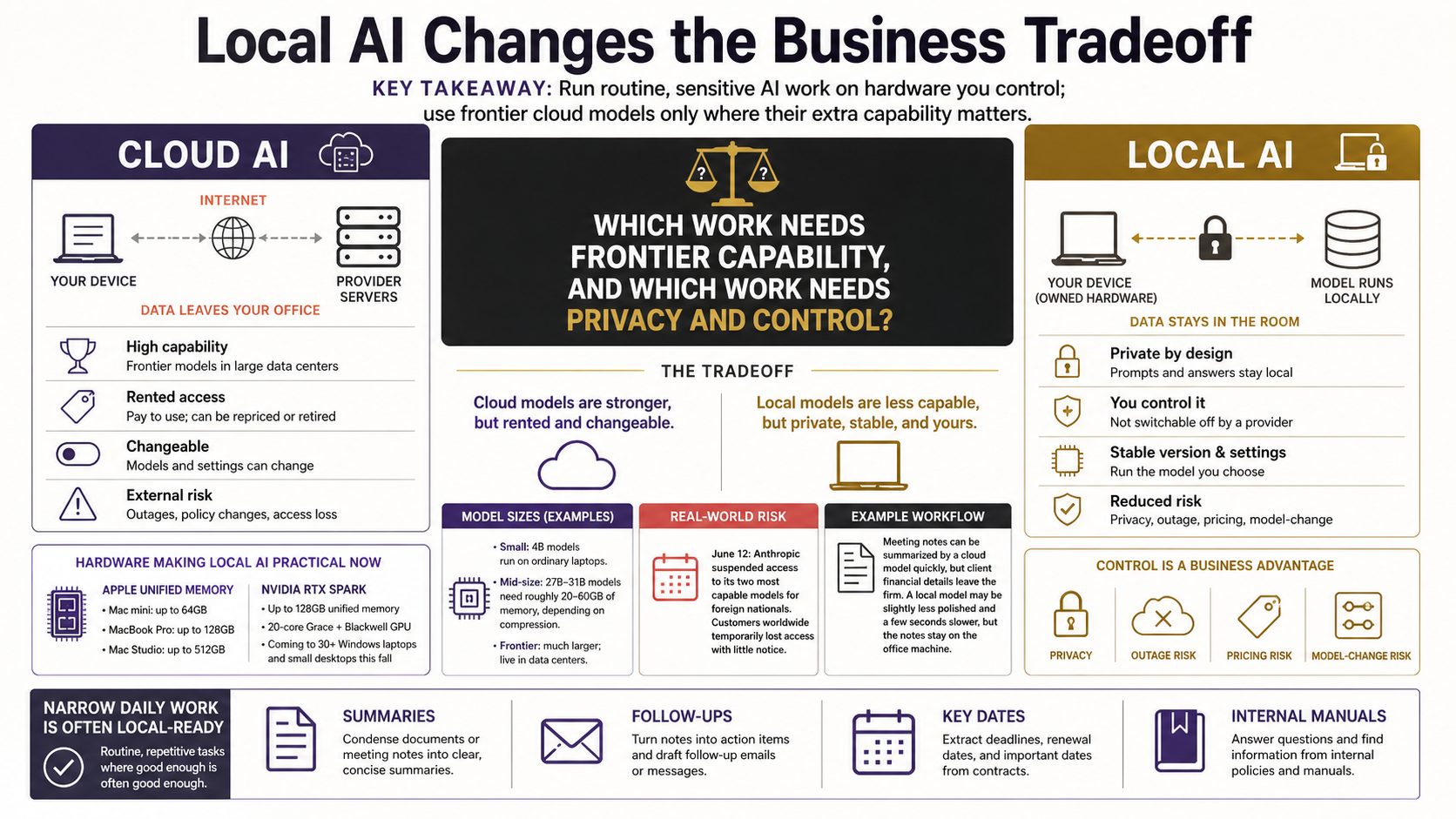
What "Runs Locally" Actually Means, and Why It Suddenly Matters for Your Firm
Running an AI model on your own hardware keeps your data in the building and out of reach when a cloud model gets pulled or repriced. Here's what local AI actually means, and why any business can now do it on a single machine.
In the last few weeks, two things happened that, taken together, should change how any business thinks about AI, whatever its size.
First, the hardware got real. Nvidia announced RTX Spark, a chip that puts what used to be data-center-grade AI into laptops and small desktops shipping this fall, and Microsoft backed it. Days later, at its June 8 developer conference, Apple spent a chunk of its keynote arguing that the smartest place to run AI is not in someone else’s cloud but on the machine in front of you, with as much as possible running on the device itself and only the hardest work sent out.
Then came the warning. On June 12, the US government ordered Anthropic to suspend access to its two most capable models for all foreign nationals. To comply, Anthropic pulled those models offline for every customer worldwide, overnight, with almost no notice. The best tool many businesses were using simply switched off. Anthropic’s other models stayed available and the block is expected to be temporary, but the message was clear enough.
One story is about where AI can run. The other is about who decides whether you can keep using it. Both point the same way: when you can, it pays to keep AI on hardware and systems you control.
This applies to a business of any size. A bigger company has more at stake and more to coordinate, but the underlying move is the same either way. And for a smaller shop, there’s a specific piece of good news: you don’t need an enterprise budget or an IT department to act on it. The thing that was experimental a year ago, and that used to take a server room, now runs on a single machine you can buy off a shelf. If you’ve been watching AI from a safe distance, this is the moment it’s worth stepping closer, not because you’re behind, but because the timing is finally good.
So what does “running an AI model locally” actually mean, why are people suddenly excited about it, and where are the real limits? If you can tell the difference between a file on your laptop and a file in Dropbox, you have enough background to follow along.
The decision you’re actually facing
Here’s the question underneath all of this, stripped of the hype: where does your data go when you use AI, and who else can see it?
Most of the AI tools you’ve touched so far (the chatbots, the writing assistants, the meeting summarizers) work the same way. You type something, it gets sent over the internet to a company’s servers, a very large model processes it there, and the answer comes back. That’s cloud AI. It’s how most of the industry works, and for a lot of tasks it’s genuinely fine.
But “your data leaves the building” is a real sentence with real consequences. For some firms it’s an annoyance. For others (a financial advisor handling client portfolios, a manufacturer with proprietary process data) it’s the whole reason they’ve kept AI at arm’s length.
Local AI flips the arrangement. The model lives on your own hardware. When you ask it something, nothing goes to the internet. The processing happens on the chip in your laptop or a small box in your office, and the answer never left the room. That’s the entire idea. Everything else is detail.
What “the model” actually is
People say “an AI model” like it’s a mysterious cloud-thing, but for the purpose of running one locally, it helps to think of it as a very large file.
A model is a single file (sometimes a few files) full of numbers. Those numbers are the patterns the model learned during training. When you run the model, your computer loads that file into memory and uses it to predict, word by word, what a good answer looks like. Bigger file, generally smarter model, but also more memory and more horsepower needed to run it.
That’s why hardware suddenly matters. To run a model locally, your machine has to be able to hold the whole file in fast memory and crunch through it quickly enough that you’re not waiting forever for each reply.
This is the number that determines almost everything: how big is the model, and how much fast memory does your machine have? A small model, like the 4-billion-parameter version of Google’s Gemma 4, is a couple of gigabytes and runs on an ordinary laptop. A more capable mid-size model, like Gemma 4 at 31 billion parameters or Alibaba’s Qwen 3.6 at 27 billion, needs somewhere in the range of 20 to 60 gigabytes, depending on how much it’s been compressed (more on that in a later article). Both Gemma and Qwen are free, open model families a business can start with today. The frontier models from the big labs are far larger again, which is exactly why they live in data centers and you rent them by the question.
Why the hardware news matters
For years, the catch with local AI was simple: the hardware to run anything useful was expensive, power-hungry, and awkward. You needed a gaming PC stuffed with graphics cards, or you needed to be comfortable with Linux and command lines.
Two things changed that.
First, Apple’s approach to memory. Macs with Apple’s own chips use what’s called unified memory, where the processor and the graphics side share one big pool of fast memory instead of copying data back and forth between separate chips. That detail turned out to matter enormously for AI, because the model has to fit in that memory to run. The machines Apple sells today have plenty of it: a Mac mini configures up to 64GB, a MacBook Pro up to 128GB, and a Mac Studio up to 512GB. A Mac you might buy for video editing turns out to be a quietly capable local AI machine. Apple’s WWDC announcements this month were all software, not new hardware, and a refresh is expected in September, but the current machines already do the job.
Second, Nvidia’s RTX Spark. Announced May 31, it pairs a 20-core Grace processor with a Blackwell graphics chip and up to 128 gigabytes of unified memory, and Nvidia says it’s headed into more than 30 Windows laptops and a wave of small desktops starting this fall, from Dell, HP, Lenovo, Microsoft Surface and others. The headline they’re chasing is “data-center AI in something you can carry,” and while marketing is always a little ahead of reality, the direction is real.
So the picture in mid-2026 is this: the two largest forces in personal computing, Apple on one side and the Nvidia-plus-Windows camp on the other, are both racing to make local AI a normal feature of an ordinary computer. When that happens, the question for your firm stops being “is this possible” and becomes “is this worth doing for the work I actually have.”
The real trade-off
Now the part most vendors skip. A model that runs on your laptop is less capable than the frontier model you’d reach through a cloud API. That’s not a maybe. The biggest, smartest models are big and smart partly because they’re enormous, and enormous things don’t fit on a laptop. A local model will more often lose the thread on a complicated request, get a fact wrong, or produce something flatter than what the top cloud model would give you.
If you only ever measured AI by “give me the single most impressive answer to a hard, open-ended question,” local would lose every time.
But that’s not what most business work looks like. A huge share of the AI that actually saves a team time is narrow and repetitive: summarize this document, turn these messy notes into a clean follow-up, pull the key dates out of this contract, rewrite this paragraph in plainer language, answer a question using our own internal manual. For tasks like those, a good local model is often more than enough. The gap between local and frontier is real, and for a narrow job it frequently doesn’t matter.
The skill, and this is exactly the kind of thing my assessment work is built around, is knowing which of your tasks fall on which side of that line. Some genuinely need the frontier model. Many don’t. Spending frontier-cloud money and sending sensitive data out of the building for a job a local model could have done privately is a common and expensive mistake.
A concrete example
Picture a small advisory office. Every client meeting produces a page of rough notes. Someone has to turn those into a clean summary and a list of follow-up actions, and right now that’s twenty minutes of an advisor’s afternoon, repeated several times a day.
The cloud version: paste the notes into a chatbot, get a polished summary back in seconds. Fast and good, but the client’s financial details just traveled to a third-party server, which may be a problem the firm doesn’t want.
The local version: the same notes go into a model running on the office Mac. The summary comes back maybe a touch less polished, takes a few seconds longer, and never leaves the machine. For this task, “a touch less polished but completely private” is usually the better trade. The advisor edits the summary the same way they would have either way.
Same task, two very different risk profiles. That choice, multiplied across all the small AI-shaped jobs in a business, is what this whole series is about.
A second question: who can switch it off?
So far this has been about privacy, where your data goes. The last few weeks raised a second question that’s harder to ignore: who controls whether you can keep using the AI at all?
On June 12, the US government ordered Anthropic, one of the leading AI labs, to cut off foreign access to its two most capable models. To comply, Anthropic took those models offline for every customer worldwide, with almost no notice. Businesses that had built a daily workflow on the best available model found it switched off. Anthropic’s other models stayed up and the block is expected to be temporary, but it made the risk concrete: a frontier model you reach through someone else’s cloud is something you rent, not something you own, and the terms can change overnight for reasons that have nothing to do with you.
Privacy is about who can see your work. Control is about who can take the tool away. A capable model running on a machine you own can’t be switched off by a policy change, an export rule, a price increase, or a lab retiring last year’s version. Nobody reaches into your office and turns it off.
Control also buys consistency. A cloud provider can update or replace its model whenever it likes, and a model that quietly changes under you can break a prompt or a workflow you had tuned to the old behavior. When you run your own, you choose the exact version and settings, including how much it’s compressed, and they stay put until you decide to change them. For a process you depend on every day, that predictability is worth a lot.
This doesn’t mean abandon the cloud. The frontier models are more capable, and for plenty of work they’re the right call. It means don’t build your critical, everyday work on the assumption that one rented model will always be there on yesterday’s terms. Keep the routine, sensitive work on something you control, and keep your options open for the rest. The push by Apple and Nvidia to make local AI normal is what turns “something you control” into a realistic option now, rather than a wish.
What to take away
You don’t need to understand neural networks to make good decisions here. You need four ideas.
- Local AI means the model runs on your hardware and your data never leaves, while cloud AI means your data goes out to be processed elsewhere.
- The reason this is suddenly practical is that ordinary computers from Apple and the Nvidia/Windows camp can now hold and run genuinely useful models, and the hardware is only getting better from here.
- Local models are less capable than frontier cloud models, but for the narrow, repetitive, sensitive tasks that fill a real workday, they’re frequently good enough, and the privacy you get in exchange is worth a lot.
- Privacy isn’t the only reason to keep work close. A model on hardware you own can’t be quietly switched off or repriced by someone else, which the Fable suspension just showed is a real risk with rented frontier models.
I’ve planned follow on articles that get more specific. We’ll look at what this means concretely for a financial advisory practice and for a manufacturer, since those are two fields where keeping data in the building isn’t a preference, it’s a requirement. After that I’ll demystify the technical bits (the numbers on a model’s spec sheet that tell you whether it’ll even run on your machine), and finish with the framework I actually use to decide which tasks belong local and which belong in the cloud.
If you’re already wondering which of your own day-to-day tasks could move to a private, local setup, that’s the right question, and it’s the one I’d start with. I’m always glad to talk it through.