Apple's Local AI Argument
Privacy, cost, and AI built into the apps you already use. Apple's WWDC announcements line up with the case for going local, and that matters for small firms.
There’s a quiet shift happening in how businesses can use AI: running it locally, on your own hardware, with your data staying in the building, instead of sending everything out to someone else’s cloud. For a while that’s been a niche idea. It’s about to become a normal way to work.
On Monday, Apple spent a large chunk of its developer keynote making that exact argument to the entire world.
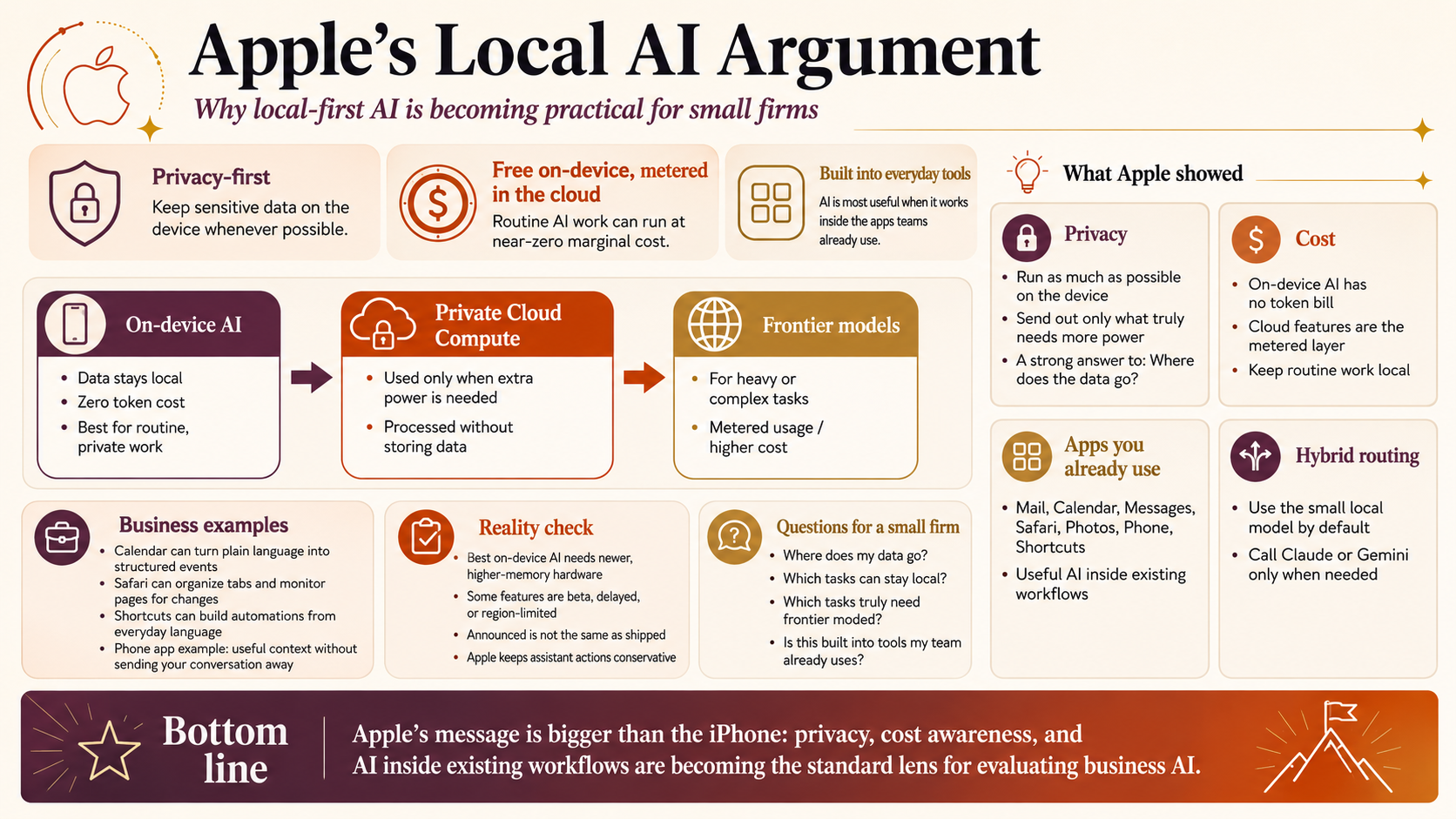
These are the parts of Apple’s announcment that apply to how a small firm uses AI. For privacy focused businesses, such as a financial advisor or a manufacturer, the point is that Apple built its AI strategy around three things: privacy, cost, and putting AI inside the tools you already use rather than off in a separate chatbot.
Privacy was the central pitch
Apple’s framing was clear. Craig Federighi said, in plain terms, that most AI providers retain your personal interactions by default, and that the burden falls on you to claw your privacy back by deleting conversations or turning features off. Apple’s counter-position was that privacy in AI is “non-negotiable.”
To back that up Apple runs as much as it can directly on your device, where the data never leaves. When a request needs more power than the device has, it goes to something they call Private Cloud Compute, which they describe as processing your data without storing it or making it accessible to Apple or anyone else, in a way outside experts can verify.
Strip away the branding and that’s the local-first idea, scaled up. For a firm that has been keeping AI at arm’s length because “where does the data go” never had a good answer, the most valuable company in the world just spent an hour validating the question and showing one way to answer it.
The clearest small example was the phone app. When you call a business, it can surface your confirmation number or relevant details from your other apps, and Apple pointed out that it looks at who you’re calling, not what you’re saying, and runs entirely on the device so nothing is shared. That’s the local pattern in miniature: useful, and private because the processing never left the phone.
Cost: free on the device, metered in the cloud
In the developer session, Apple told app makers that the on-device model runs with zero token cost. Their new Core AI framework, which lets developers run models locally on Apple hardware, was described as running “with zero server dependencies and zero token costs.” They even said, directly, that getting started exploring ideas shouldn’t be held back by infrastructure costs.
That is the local-versus-cloud cost difference in a sentence. Cloud AI charges you per use. Local AI is a fixed cost you’ve already paid for in the hardware, and once the work runs on the device, the running cost is effectively nothing.
Apple draws the line itself, too. The features that lean on its bigger cloud models, like image generation and spatial photo reframing, come with daily usage limits, and you pay to raise them through an iCloud subscription. So the everyday work runs locally for free, and the heavy work is metered in the cloud. Deciding which of your tasks belongs on each side of that line is most of the work.
AI built into the apps you already use
Apple built this AI into Mail, Calendar, Messages, Safari, Photos, the phone app, and Shortcuts, rather than putting it in a separate app you visit.
A few that translate directly to business work. Calendar can create an event from a plain-language description and correctly pick out the person, the place, and the title. Mail offers context-aware actions, including handing off to third-party apps. Safari can group a sprawl of tabs by topic and watch a page for you, then notify you when something changes, which is genuinely useful for anyone tracking a supplier page or an availability. Shortcuts, the automation tool, now lets you describe what you want in everyday language and assembles the steps for you, which lowers the bar for automating a repetitive task.
The mechanism underneath, for the slightly more technical reader, is a framework called App Intents. When an app describes its content and actions in a way the system understands, the assistant can search it, pull from it, and act in it. The practical upshot, flagged well in the reaction coverage, is that this mostly works for apps whose developers opt in, and it generally won’t override your defaults unless you ask. So if your firm runs on a third-party CRM or a non-Apple notes app, whether this helps you depends on whether that app’s makers wired it up. That’s worth checking before you assume the magic applies to your stack.
For developers, and this matters if you ever commission custom tooling, Apple now lets an app use the small on-device model for free and private work, and call out to a big frontier model like Claude or Gemini through the same code when a task genuinely needs the extra power. That is the hybrid routing idea built right into the platform: cheap and private by default, frontier power on demand.
What to keep in perspective
First, the most capable on-device model needs the newest, highest-memory hardware. That’s just how it works: the size of the model you can run is limited by the memory in the machine. Apple’s most advanced models are limited to phones with 12 gigabytes of memory, meaning only the very latest models at launch. For a firm, it’s a reminder that “can my hardware actually run this” is a real question, not a given. However having an in house Mac mini or Mac Studio may be worth the the cost.
Second, Apple built these models in deep collaboration with Google, using the technology behind Google’s Gemini. That doesn’t undercut the privacy story, since the running of the models is what’s kept private, but it’s a useful dose of reality about how even Apple isn’t doing this entirely alone.
Third, the new Siri is coming in beta later this year, not today, and it won’t launch in the EU or China at first for regulatory reasons. Announced is not the same as shipped. If you’re making a decision for your business, you make it on what you can use now, not on a demo.
And fourth, Apple deliberately kept its assistant conservative. It will add the event to your calendar, but it stops short of the riskier “go make a purchase for me” behavior some competitors are showing. For a regulated advisory practice or a manufacturer, that caution is the right instinct, and it’s the instinct I’d want any AI you deploy to share.
What to actually take from this
You don’t need an iPhone strategy out of this. The privacy-first, cost-aware, run-it-on-your-own-hardware approach to AI just got a strong endorsement from the company with the most to lose by getting it wrong. The questions worth asking, where does my data go, what does this actually cost to run, and is it inside the tools my team already uses, are now the questions the whole industry is organizing around.
That’s a good moment to stop watching and start thinking about which of your tasks could run privately on hardware you already own or could buy once. Which genuinely need a frontier model and a metered cloud bill. And which involve data you should never have been sending out in the first place. That sorting is the heart of an AI Workflow Assessment, and if the past week made the whole topic feel suddenly more real, a short intro call is an easy way to find out what it means for your specific situation. I’m glad to talk it through.