Building Modern Voice AI Systems - A Practical, Technical Overview
A practical overview of modern voice AI architectures, latency tradeoffs, streaming patterns, and design choices for real-time conversational products.
I’ve been working on a voice assistant app GetAudioInput.com and have been learning a lot about the topic. This is a summary of my related notes.
1. Why Voice + LLMs Are Taking Off
Voice interfaces have been “almost here” for more than a decade. But lately something changed—they finally started feeling good. Not gimmicky, not robotic, not frustrating. Actually useful. That shift comes from three trends maturing at the same time.
First, speech recognition and synthesis have simply gotten excellent. Today’s ASR models can handle fast talkers, accents, background noise, and the occasional mid-sentence tangent. And TTS voices now deliver warmth, clarity, and emotion rather than sounding like airport announcements.
Second, LLMs brought real conversation into the mix. Older assistants were essentially command interpreters—great for timers and weather, terrible for anything nuanced. LLMs unlocked genuine back-and-forth, context retention, and the ability to handle unexpected questions without melting down.
Finally, users are ready. We carry microphones everywhere, we talk to our earbuds, and many workflows—customer support, field work, accessibility, driving, fitness—finally feel appropriate for voice-first interactions.
Of course, voice isn’t perfect for everything. Loud cafés, shared offices, and tasks requiring fine-grained data entry will probably never be ideal environments. But when voice works, it works really well.
2. The Three Architectures Behind Modern Voice Systems
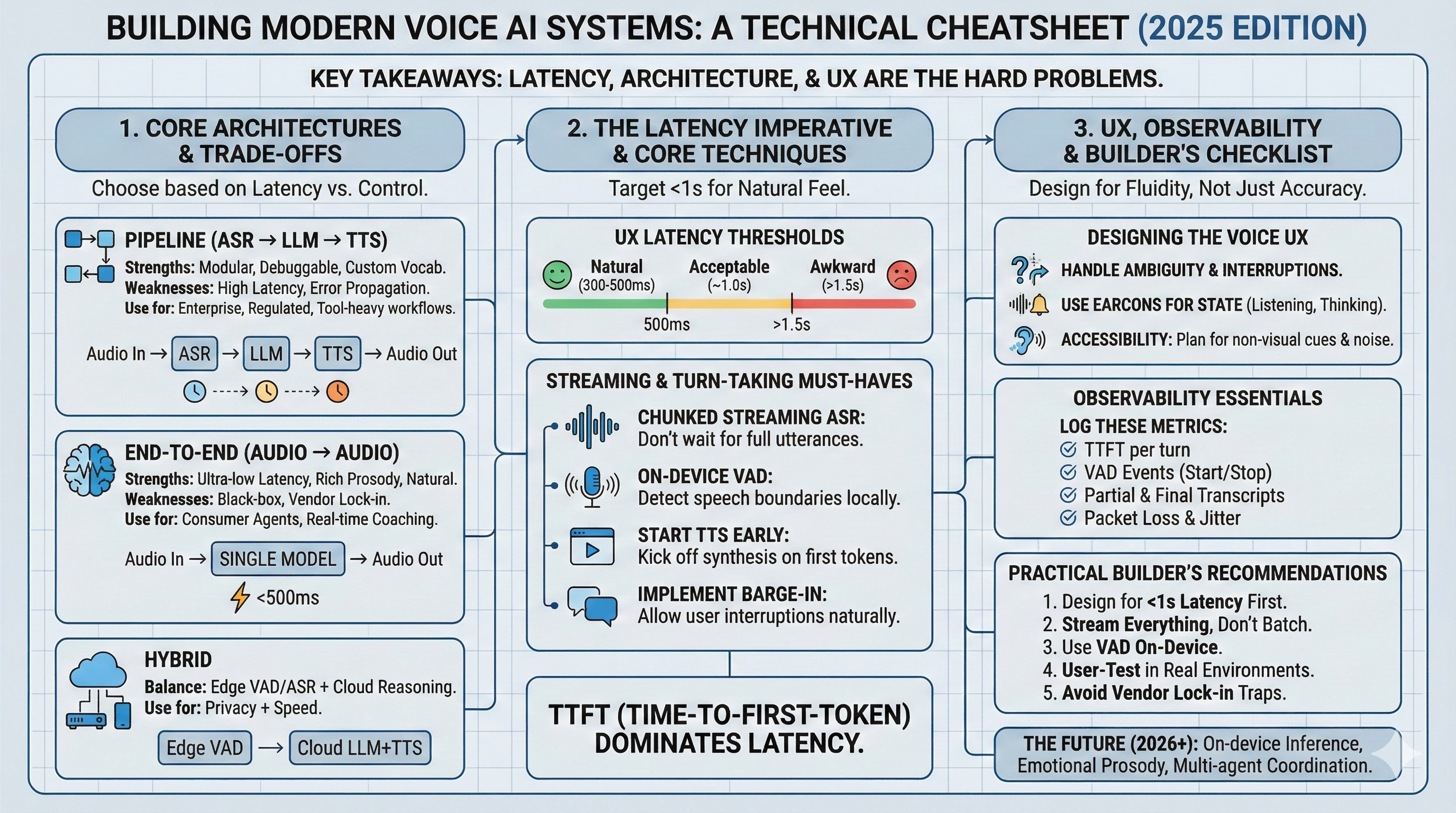
Modern voice systems largely fall into three patterns. Each has tradeoffs, and none is “the right one” for every product—it’s more about choosing the right tool for your scenario.
2.1 The Classic Pipeline (ASR → LLM → TTS)
This is the architecture most people imagine:
Audio → ASR → (text) → LLM → (text) → TTS → AudioIt’s modular, easy to debug, and straightforward to integrate with analytics or compliance requirements. But every step adds latency, and errors can cascade—a misheard word might steer the LLM down the wrong path.
2.2 End-to-End Models (Audio → Audio)
This is the new wave: multimodal, speech-in/speech-out systems that never convert audio to text unless you explicitly ask for it.
The upside is obvious: speed, naturalness, fewer moving parts, and the ability to preserve tone and emotion. The downside? Less control, fewer places to instrument, and you’re often more tightly coupled to whichever vendor provides the model.
2.3 Hybrid Approaches
Many production teams end up somewhere in the middle—local VAD for snappy responsiveness, cloud LLM for heavy reasoning, optional ASR for transcripts or analytics, and sometimes even fallback modes for noisy environments.
The result: a balance of speed, control, and debuggability.
3. Latency: The Real Boss of Voice UX
You can have the smartest model in the world, but if it’s slow, the entire experience falls apart. Voice is incredibly sensitive to timing:
- Over 1.5 seconds: feels laggy
- Around 1 second: tolerable
- 300–500ms: starts to feel human
Time-to-first-token (TTFT) often dictates whether an interaction feels alive or sluggish. This is why end-to-end models are gaining momentum—they reduce latency across the entire chain.
4. Streaming, Turn-Taking, and “Talking While Listening”
Human conversations aren’t serialized. We interrupt each other, speak over one another, and pick up on cues long before a sentence ends. Voice AI needs to mimic these behaviors to feel natural.
That usually requires:
- Streaming ASR and streaming TTS
- Early LLM reasoning (generating before the ASR is done)
- Barge-in support so users can interrupt
- VAD and VAP for detecting when someone is about to talk
- Speculative inference to reduce perceived delay
These features, more than raw model quality, determine whether your app feels “alive.”
5. How Audio Actually Reaches Your Model
Most teams start with WebRTC because it’s browser-friendly, handles network weirdness for you, and offers low-latency transport. Under the hood it relies on ICE, STUN, and TURN—acronyms that sound intimidating but basically boil down to “find a path through whatever routers and firewalls people have.”
For telephony use cases (call centers, surveys, voice IVRs), PSTN and SIP still matter. The audio quality is lower, but the reliability is unmatched.
A quick word about codecs:
- G.711: great for ASR, large bandwidth
- G.722: good compromise
- G.729: highly compressed—avoid it if accuracy matters
6. ASR in the Real World
Even the best ASR will struggle with:
- Wind noise
- Speaker overlap
- Cheap laptop mics
- Heavy accents
- People talking while walking through traffic
Plan for some misrecognition. Good voice UX anticipates failure modes and recovers gracefully.
7. Observability and Debugging
Voice systems are harder to debug than text-based ones because so much is happening at once. Logging the right signals makes a huge difference:
- Partial and final transcripts
- VAD state
- TTFT and TTS timings
- Barge-in events
- Network jitter
- Audio frame delivery
Pipeline architectures make this easy because each component emits its own logs. End-to-end systems require more creative instrumentation, but it’s still essential.
8. Choosing the Right Architecture
Use a pipeline if you need: compliance, tool usage, or fine-grained auditing.
Use end-to-end if you want: the fastest, most natural conversational experience.
Use hybrid if you want: speed and flexibility without fully committing to either extreme.
9. Practical Advice for Teams
After working on a few of these systems, certain lessons repeat themselves:
- Optimize latency first. Everything else comes second.
- Stream audio both ways. Batch mode kills the experience.
- Local VAD is a secret weapon. It makes the system feel responsive.
- Start TTS early. Your system doesn’t need to wait for the full LLM response.
- Support interruptions. Barge-in is crucial for natural conversation.
- Expect ASR errors. Design for recovery, not perfection.
- Instrument everything. You’ll need the data.
- Watch out for vendor lock-in. Audio models are evolving quickly.
- Test in noisy and real environments. Lab demos lie.
- Voice UX is its own design discipline. Don’t treat it like a text interface with audio glued on.
Glossary
ASR — The part that turns speech into text.
Audio Context — Tone and emotion the LLM might miss if everything goes through text.
Barge-In — When the user interrupts the AI mid-sentence.
Chunking — Sending audio in small slices for low latency.
Codec — Determines how audio is compressed and how good it sounds.
DTMF — Those keypad tones used in phone menus.
Edge Processing — Doing some audio work (like VAD) on the user’s device for speed.
Earcons — Little beeps that signal “listening” or “thinking.”
Endpointing — Knowing when someone finished talking.
Hybrid Architecture — A mix of pipeline and end-to-end approaches.
ICE/STUN/TURN — The behind-the-scenes networking that makes WebRTC work.
Latency — The delay users feel. The #1 UX factor in voice.
MCU/SFU — Media servers for multi-party audio/video.
Multimodal LLM — Models that accept audio directly.
PSTN — The old-school phone network.
RTCP/RTP — Protocols carrying real-time audio/video.
Speculative Inference — The model starts reasoning before the ASR is finished.
Speech-to-Speech — End-to-end voice systems.
Streaming TTS — Generates speech as it goes, not all at once.
TTFT — Time to the first LLM token—crucial for responsiveness.
Turn-Taking — Coordinating who speaks when.
VAD — Distinguishes speech from silence.
VAP — Predicts when someone is about to speak.
Vocoder — Turns model outputs into actual audio waveforms.
WER — Measures ASR accuracy.
WebRTC — Common tech for real-time browser audio/video.